
How to Download and Install Singapore Pools App
For Android

Download the official app only from the official Singapore Pools website.
1. Download the APK file
If you are viewing from mobile, click here to download the Android App Installer.
If you are viewing from desktop, scan the QR code below.

2. Install
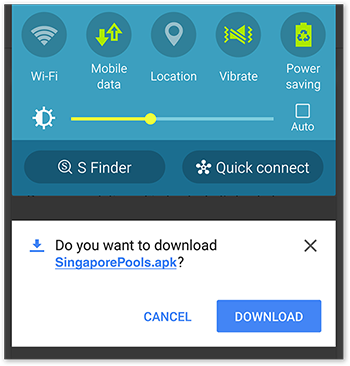
When download completes, tap "DOWNLOAD" from the notification box to install.
Alternatively, the Singapore Pools APK file should be in the "Downloads" folder.
3. Settings
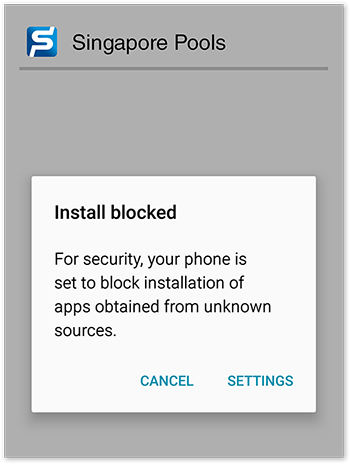
If an "Install blocked" message appears, select "SETTINGS".
4. Enable unknown sources
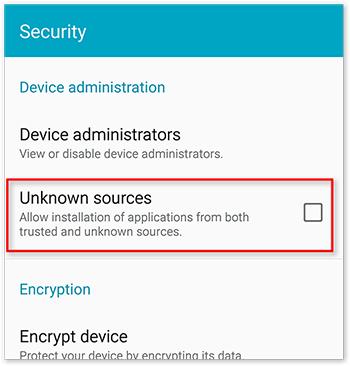
In the device administration settings, enable "Unknown sources" to allow installation of applications from external sources.
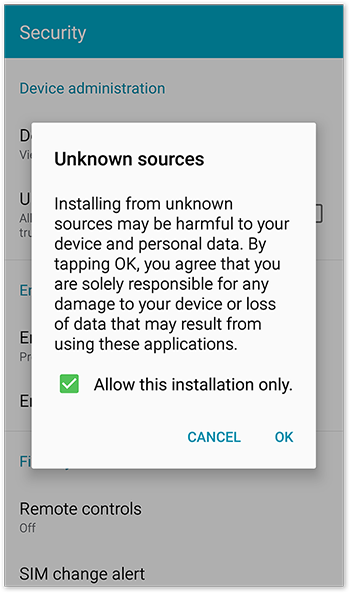
A message about "Unknown sources" will appear. Select "OK" to proceed.
5. Select install
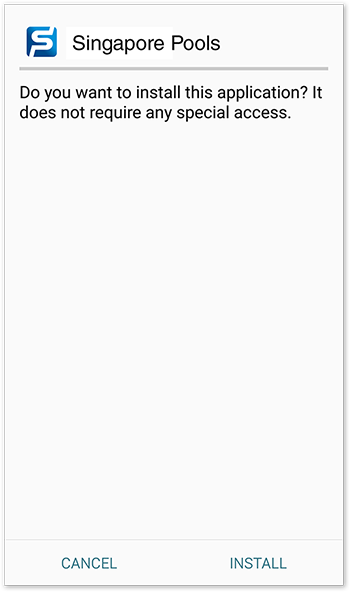
On the installation screen, select "INSTALL".
6. Open
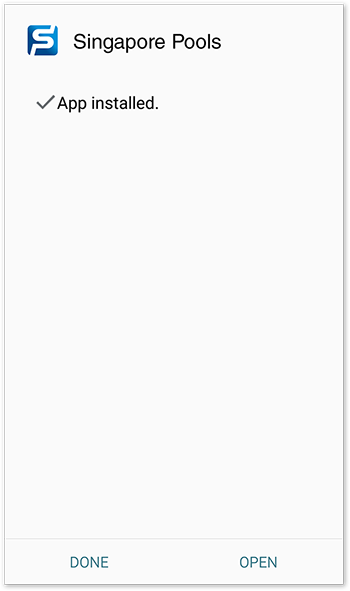
When installation completes, select "OPEN" to start using the Singapore Pools app.
7. Disable unknown sources
Upon the completion of installation, disable unknown source by unchecking the checkbox.
For Apple iOS

Download from the official Apple App Store.
Age verification may be required by Apple App Store when downloading or updating the Singapore Pools App.